
RCX for TiVo2.0.4 - Get APK
You'll be able to download in few seconds.
Publisher Description
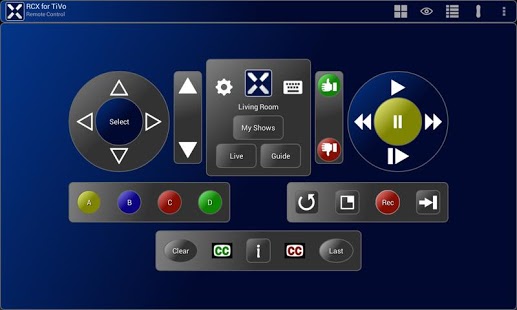
Tired after a long day at work and want to relax on the couch while watching your favorite shows but can't find your TiVo® remote? Grab your phone or tablet, you've got it with you anyway. Problem solved!
Product Features
- Control your TiVo Series3™ (or greater) with your Android phone or tablet!
- Search for your favorite shows using the on-screen device keyboard, hardware keyboard or even a USB keyboard if your device supports it.
- Keep your eyes on the show your watching with the new "Watch TV" trackpad.
- Simple design, easy to use
Suggestions and feedback are always welcome!
Quick Start
This quick start quide assumes your TiVo(R) is connected to your home network. This means you need a network cable or wireless TiVo adapter connected to your TiVo and configured properly. Please see your TiVo documentation for more information.
1) Connect to Wi-Fi
The device running RCX must be connected to the same network as the TiVo®. Typically this means the device must be connected to your home Wi-Fi network.
2) Enable "Network Remote Control"
Enable the "Network Remote Control" setting on the TiVo. Do this by navigating the TiVo menu to "Settings & Messages\Settings\Remote, Cable Card & Devices\Network Remote Control".
3) Add the TiVo network IP address to RCX
Your TiVo network address must be added to RCX. To find the TiVo network IP address navigate the TiVo menu to "Settings & Messages\Settings\Network & Phone". The TiVo network IP address should be displayed. Tap the "gear" icon in RCX, choose "TiVo DVRs" then tap the "Add TiVo" button and enter the information requested. Alternatively you can choose "TiVo DVRs" and use the "Scan" button to try to automatically identify your TiVo's IP address.
Notes
- The TiVo web site accessed from the RCX menu can be changed in the options. This is particularly useful if you live outside the US.
- TV volume and input cannot be controlled by the TiVo itself and this app can't do it either. The TiVo remote uses infrared which nearly all android devices lack.
TiVo® is a registered trademark of Tivo Inc.
YouTube® is a registered trademark of Google Inc.
About RCX for TiVo
The company that develops RCX for TiVo is Rames. The latest version released by its developer is 2.0.4.
To install RCX for TiVo on your Android device, just click the green Continue To App button above to start the installation process. The app is listed on our website since 2013-07-04 and was downloaded 0 times. We have already checked if the download link is safe, however for your own protection we recommend that you scan the downloaded app with your antivirus. Your antivirus may detect the RCX for TiVo as malware as malware if the download link to rc.apps.rcXFull is broken.
How to install RCX for TiVo on your Android device:
- Click on the Continue To App button on our website. This will redirect you to Google Play.
- Once the RCX for TiVo is shown in the Google Play listing of your Android device, you can start its download and installation. Tap on the Install button located below the search bar and to the right of the app icon.
- A pop-up window with the permissions required by RCX for TiVo will be shown. Click on Accept to continue the process.
- RCX for TiVo will be downloaded onto your device, displaying a progress. Once the download completes, the installation will start and you'll get a notification after the installation is finished.
Program Details
System requirements
Download information
Pricing
Version History
version 2.0.4
posted on 2013-07-04
* Try before you buy! See "RCX for TiVo (free)",- App now respects device silent or vibrate only setting,- Fixed rewind/channel up buttons on trackpads,- Restore on screen keypad for changing channels (thanks Craig!),- Fix trackpad so it functions after resume from sleep,- Fix for TiVo list,- New Swipe Trackpads for using the app *without* looking at the device,- New keyboard support (software, hardware & USB) for TiVo typing,- New "My Shows" button,- Custom landscape & tablet screens
version 2.0.3
posted on 2013-06-10
Several fixes and updates
Disclaimer
External Download
We do not host RCX for TiVo on our servers. We did not scan it for viruses, adware, spyware or other type of malware. This app is hosted by Galad and passed their terms and conditions to be listed there. We recommend caution when installing it.
The APK Download link for RCX for TiVo is provided to you by apps112.com without any warranties, representations or guarantees of any kind, so access it at your own risk.
If you have questions regarding this particular app contact the publisher directly. For questions about the functionalities of apps112.com contact us.
